heating Ram 1500 2014 Get to Know Guide
[x] Cancel search | Manufacturer: RAM, Model Year: 2014, Model line: 1500, Model: Ram 1500 2014Pages: 252, PDF Size: 6.74 MB
Page 29 of 252
WARNING!
• Adjusting a seat while the vehicle is moving is dangerous. The suddenmovement of the seat could cause you to lose control. The seat belt might not
be properly adjusted, and you could be severely injured or killed. Only adjust a
seat while the vehicle is parked.
• Actuating the recliner handle will allow the seatback to swing forward. Do not
stand or lean in front of the seatback while actuating the handle. The seatback
may swing forward and strike you, causing injury. To avoid possible injury, place
your hand on the seatback while actuating the recliner handle.
• Do not ride with the seatback reclined so that the seat belt is no longer resting
against your chest. In a collision, you could slide under the seat belt and be
severely injured or killed. Use the recliner only when the vehicle is parked.
HEATED/VENTILATED SEATS
Front Heated Seats
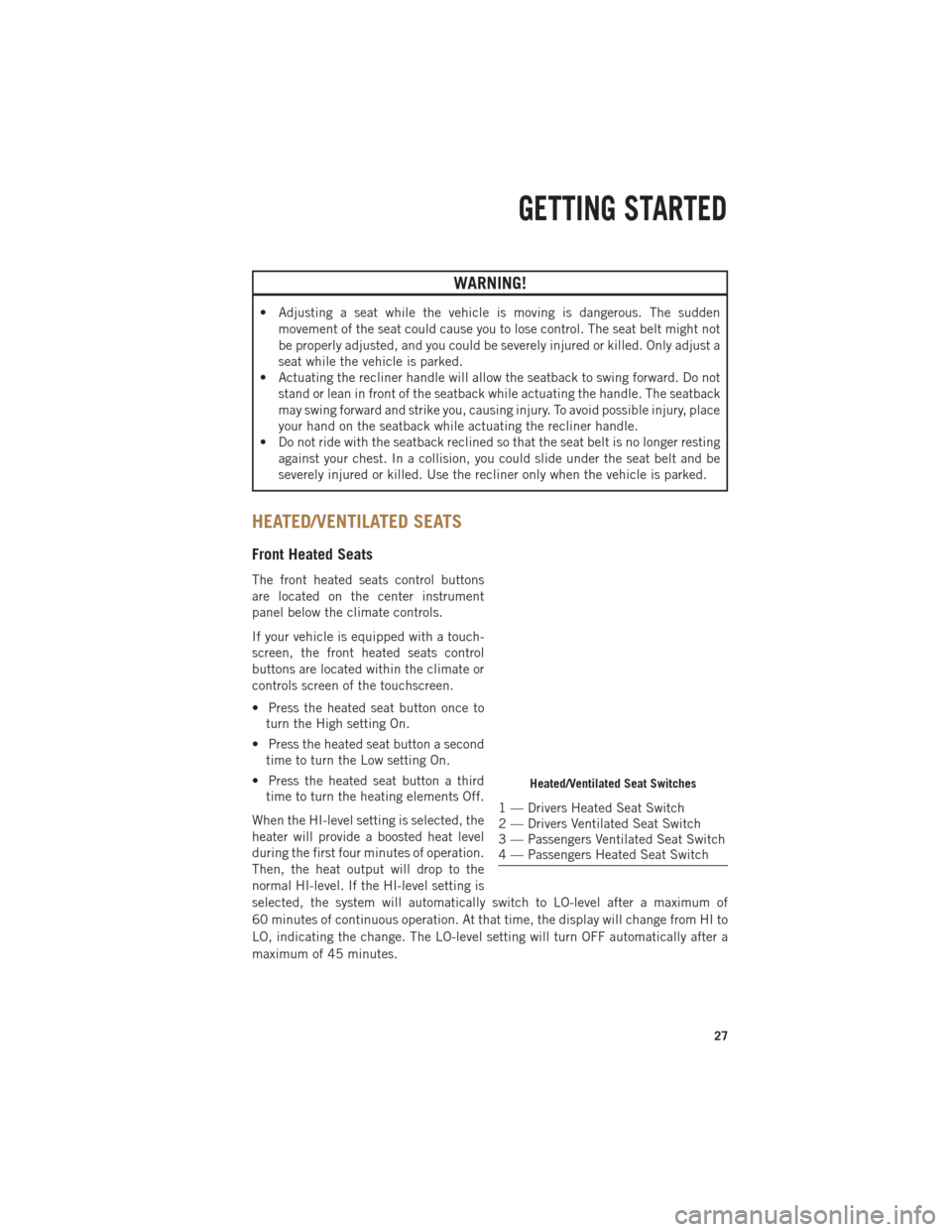
The front heated seats control buttons
are located on the center instrument
panel below the climate controls.
If your vehicle is equipped with a touch-
screen, the front heated seats control
buttons are located within the climate or
controls screen of the touchscreen.
• Press the heated seat button once toturn the High setting On.
• Press the heated seat button a second time to turn the Low setting On.
• Press the heated seat button a third time to turn the heating elements Off.
When the HI-level setting is selected, the
heater will provide a boosted heat level
during the first four minutes of operation.
Then, the heat output will drop to the
normal HI-level. If the HI-level setting is
selected, the system will automatically switch to LO-level after a maximum of
60 minutes of continuous operation. At that time, the display will change from HI to
LO, indicating the change. The LO-level setting will turn OFF automatically after a
maximum of 45 minutes.
Heated/Ventilated Seat Switches
1 — Drivers Heated Seat Switch
2 — Drivers Ventilated Seat Switch
3 — Passengers Ventilated Seat Switch
4 — Passengers Heated Seat Switch
GETTING STARTED
27
Page 31 of 252
REAR HEATED SEATS
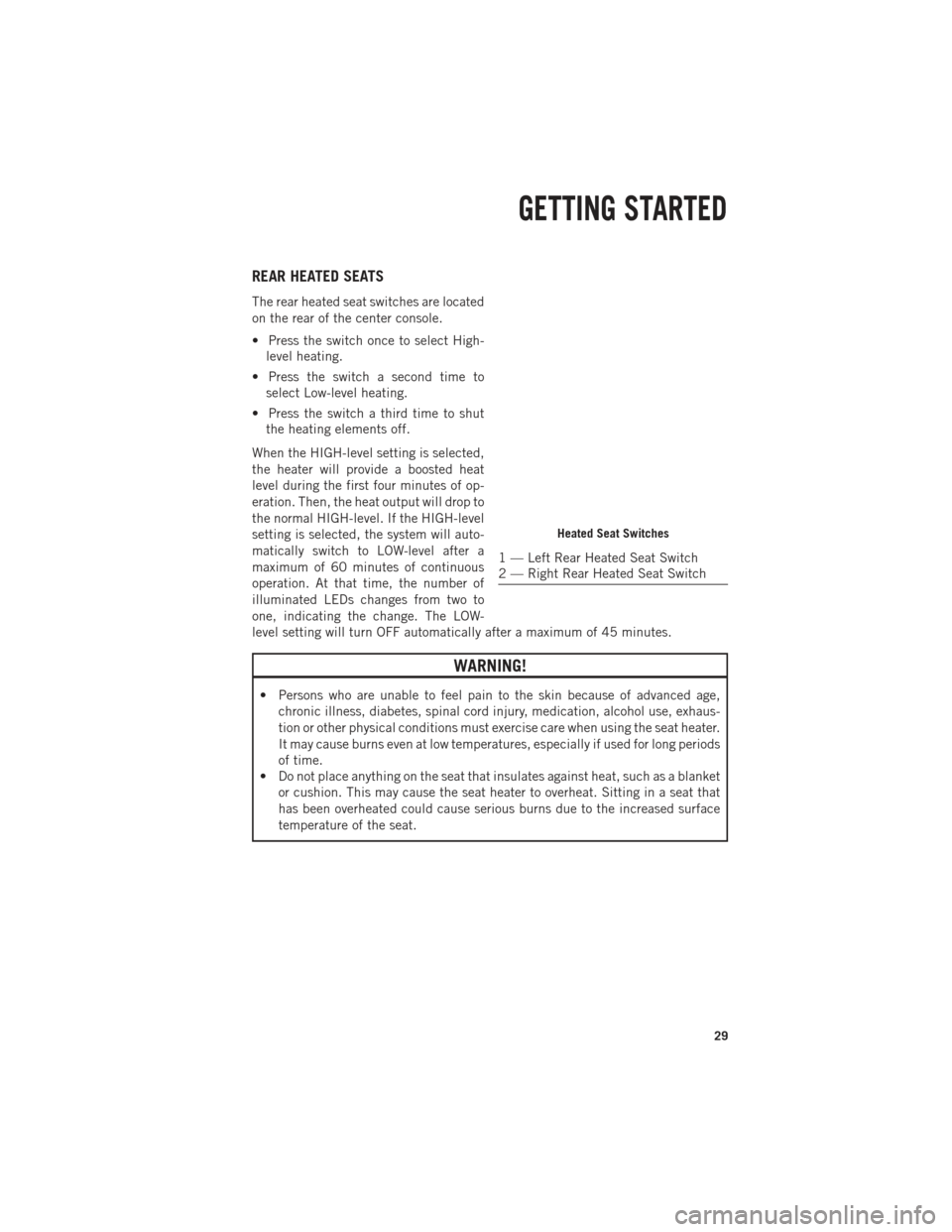
The rear heated seat switches are located
on the rear of the center console.
• Press the switch once to select High-level heating.
• Press the switch a second time to select Low-level heating.
• Press the switch a third time to shut the heating elements off.
When the HIGH-level setting is selected,
the heater will provide a boosted heat
level during the first four minutes of op-
eration. Then, the heat output will drop to
the normal HIGH-level. If the HIGH-level
setting is selected, the system will auto-
matically switch to LOW-level after a
maximum of 60 minutes of continuous
operation. At that time, the number of
illuminated LEDs changes from two to
one, indicating the change. The LOW-
level setting will turn OFF automatically after a maximum of 45 minutes.
WARNING!
• Persons who are unable to feel pain to the skin because of advanced age, chronic illness, diabetes, spinal cord injury, medication, alcohol use, exhaus-
tion or other physical conditions must exercise care when using the seat heater.
It may cause burns even at low temperatures, especially if used for long periods
of time.
• Do not place anything on the seat that insulates against heat, such as a blanket
or cushion. This may cause the seat heater to overheat. Sitting in a seat that
has been overheated could cause serious burns due to the increased surface
temperature of the seat.
Heated Seat Switches
1 — Left Rear Heated Seat Switch
2 — Right Rear Heated Seat Switch
GETTING STARTED
29
Page 32 of 252
HEATED STEERING WHEEL
The steering wheel contains a heating element that heats the steering wheel to one
temperature setting.
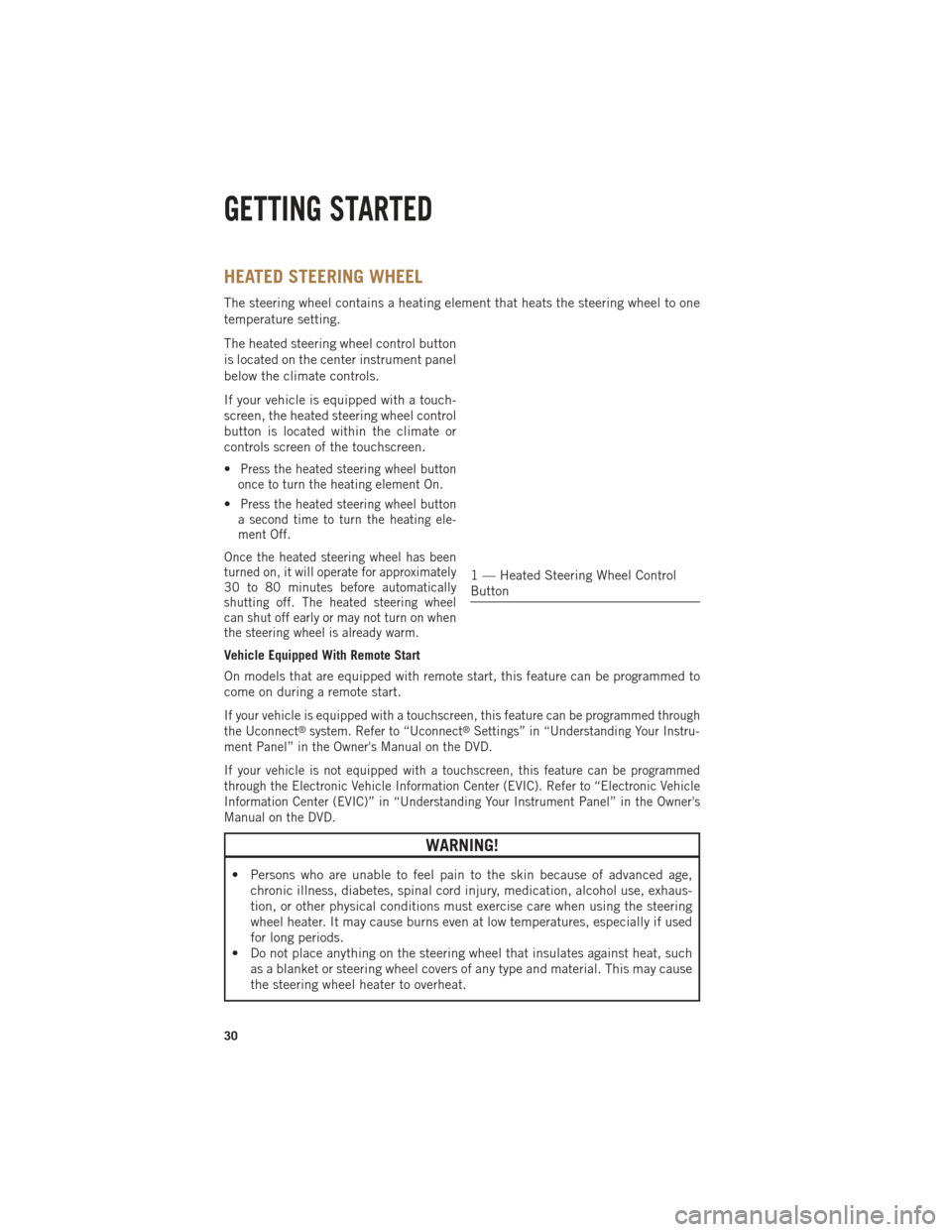
The heated steering wheel control button
is located on the center instrument panel
below the climate controls.
If your vehicle is equipped with a touch-
screen, the heated steering wheel control
button is located within the climate or
controls screen of the touchscreen.
•
Press the heated steering wheel button
once to turn the heating element On.
•Press the heated steering wheel button
a second time to turn the heating ele-
ment Off.
Once the heated steering wheel has been
turned on, it will operate for approximately
30 to 80 minutes before automatically
shutting off. The heated steering wheel
can shut off early or may not turn on when
the steering wheel is already warm.
Vehicle Equipped With Remote Start
On models that are equipped with remote start, this feature can be programmed to
come on during a remote start.
If your vehicle is equipped with a touchscreen, this feature can be programmed through
the Uconnect®system. Refer to “Uconnect®Settings” in “Understanding Your Instru-
ment Panel” in the Owner's Manual on the DVD.
If your vehicle is not equipped with a touchscreen, this feature can be programmed
through the Electronic Vehicle Information Center (EVIC). Refer to “Electronic Vehicle
Information Center (EVIC)” in “Understanding Your Instrument Panel” in the Owner's
Manual on the DVD.
WARNING!
• Persons who are unable to feel pain to the skin because of advanced age, chronic illness, diabetes, spinal cord injury, medication, alcohol use, exhaus-
tion, or other physical conditions must exercise care when using the steering
wheel heater. It may cause burns even at low temperatures, especially if used
for long periods.
• Do not place anything on the steering wheel that insulates against heat, such as a blanket or steering wheel covers of any type and material. This may cause
the steering wheel heater to overheat.
1 — Heated Steering Wheel Control
Button
GETTING STARTED
30
Page 140 of 252

TOW/HAUL MODE
• When driving in hilly areas, towing a trailer, carrying a heavy load, etc., andfrequent transmission shifting occurs, press the TOW/HAUL switch to select
TOW/HAUL mode. This will improve performance and reduce the potential for
transmission overheating or failure due to excessive shifting. When operating in
TOW/HAUL mode, transmission upshifts are delayed, and the transmission will
automatically downshift (for engine braking) during steady braking maneuvers.
• The “TOW/HAUL Indicator Light” will illuminate in the instrument cluster to
indicate that TOW/HAUL mode has
been activated. Pressing the switch a
second time restores normal operation.
If the TOW/HAUL mode is desired, the
switch must be pressed each time the
engine is started.
INTEGRATED TRAILER BRAKE MODULE
The Integrated Trailer Brake Controller allows you to automatically or manually
activate the Electric Trailer Brakes and Electric Over Hydraulic Trailer Brakes for a
better braking performance when towing a trailer.
NOTE:
The Integrated Trailer Brake Controller is located in the center stack below the
climate controls.
This module will have four different options depending on the type of trailer you want
to tow and can be selected through the 3.5” Electronic Vehicle Information Center
(EVIC) or touchscreen radio.
• Light Electric
• Heavy Electric
• Light EOH (Electric Over Hydraulic)
• Heavy EOH (Electric Over Hydraulic)
UTILITY
138
Page 154 of 252
Adding Diesel Exhaust Fluid
• The DEF gauge (located in the instrument panel) will display the level of DEFremaining in the tank.
• Completely fill the DEF tank through the diesel exhaust fluid fill location (located behind the fuel door) at every maintenance interval or before if prompted by the
Electronic Vehicle Information Center (EVIC).
NOTE:
• Driving conditions (altitude, vehicle speed, load, etc.) will effect the amount of DEF that is used in your vehicle.
• Since DEF will begin to freeze at 12°F (-11°C), your vehicle is equipped with an automatic DEF heating system. This allows the DEF injection system to operate
properly at temperatures below 12°F (-11°C). If your vehicle is not in operation for
an extended period of time with temperatures below 12°F (-11°C), the DEF in the
tank may freeze. If the tank is overfilled and freezes, it could be damaged.
Therefore, do not overfill the DEF tank. Extra care should be taken when filling
with portable containers to avoid overfilling. Note the level of the DEF gauge in
your instrument cluster. On pickup applications, you may safely add a maximum of
2 gallons of DEF from portable containers when your DEF gauge is reading ½ full.
DEF Fill Procedure
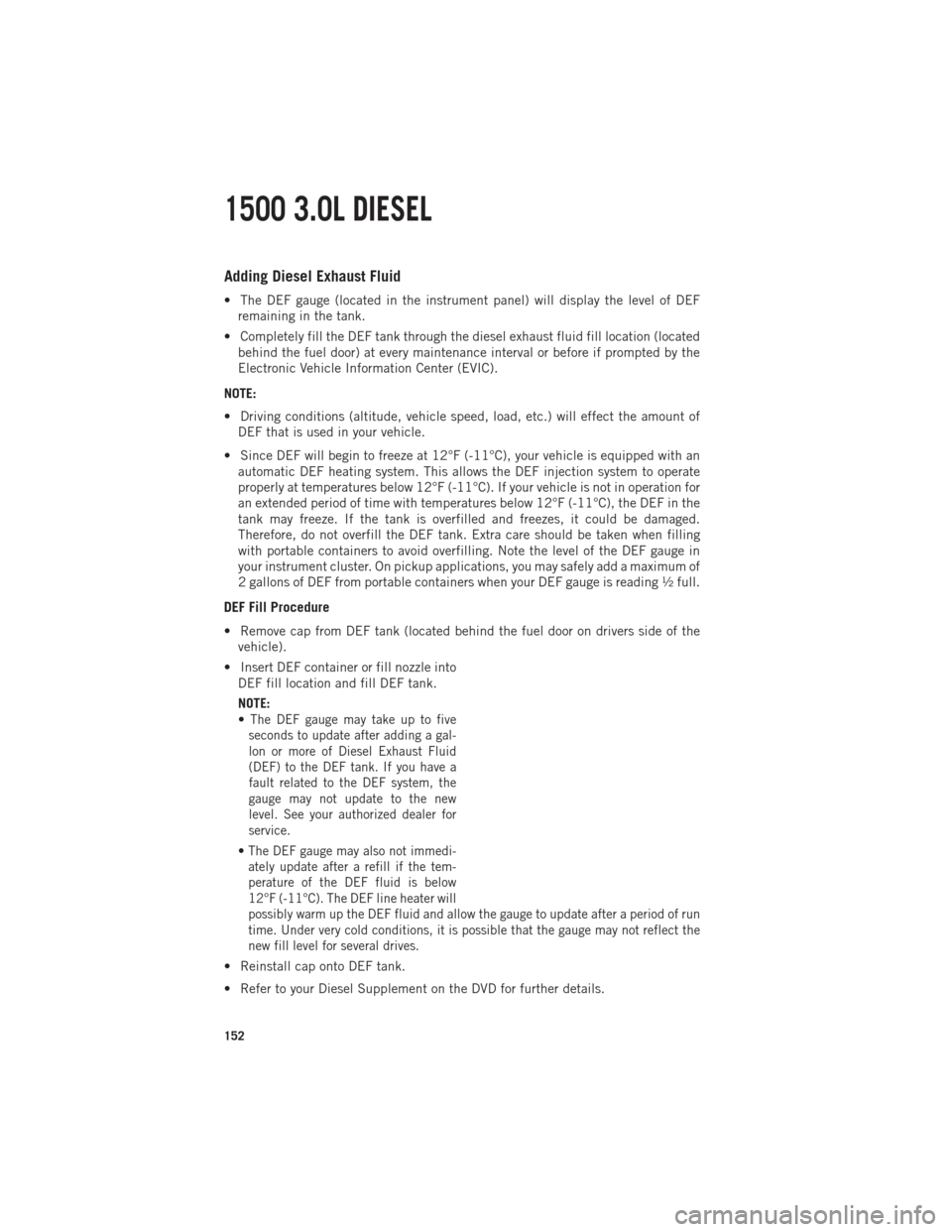
• Remove cap from DEF tank (located behind the fuel door on drivers side of thevehicle).
• Insert DEF container or fill nozzle into DEF fill location and fill DEF tank.
NOTE:
•
The DEF gauge may take up to five
seconds to update after adding a gal-
lon or more of Diesel Exhaust Fluid
(DEF) to the DEF tank. If you have a
fault related to the DEF system, the
gauge may not update to the new
level. See your authorized dealer for
service.
• The DEF gauge may also not immedi- ately update after a refill if the tem-
perature of the DEF fluid is below
12°F (-11°C). The DEF line heater will
possibly warm up the DEF fluid and allow the gauge to update after a period of run
time. Under very cold conditions, it is possible that the gauge may not reflect the
new fill level for several drives.
• Reinstall cap onto DEF tank.
• Refer to your Diesel Supplement on the DVD for further details.
1500 3.0L DIESEL
152
Page 167 of 252

NOTE:
• Your vehicle is equipped with a DEF injection system. You may occasionally hearan audible clicking noise. This is normal operation.
• The DEF pump will run for a period of time after engine shutdown to purge the DEF system. This is normal operation.
Diesel Exhaust Fluid Storage
Diesel Exhaust Fluid (DEF) is considered a very stable product with a long shelf life.
If DEF is kept in temperatures between 10° to 90°F (-12° to 32°C), it will last a
minimum of one year.
DEF is subject to freezing at the lowest temperatures. For example, DEF may freeze
at temperatures at or below 12° F (-11° C). The system has been designed to operate
in this environment.
NOTE:
When working with DEF, it is important to know that:
• Any containers or parts that come into contact with DEF must be DEF compatible(plastic or stainless steel). Copper, brass, aluminum, iron or non-stainless steel
should be avoided as they are subject to corrosion by DEF.
• If DEF is spilled, it should be wiped up completely.
Adding Diesel Exhaust Fluid
The DEF gauge (located in the instrument cluster) will display the level of DEF
remaining in the tank.
Completely fill the DEF tank through the diesel exhaust fluid fill location at every
maintenance interval or before if prompted by the Electronic Vehicle Information
Center (EVIC).
NOTE:
• Driving conditions (altitude, vehicle speed, load, etc.) will effect the amount of DEF that is used in your vehicle.
• Since DEF will begin to freeze at 12°F (-11°C), your vehicle is equipped with an automatic DEF heating system. This allows the DEF injection system to operate
properly at temperatures below 12°F (-11°C). If your vehicle is not in operation for
an extended period of time with temperatures below 12°F (-11°C), the DEF in the
tank may freeze. If the tank is overfilled and freezes, it could be damaged.
Therefore, do not overfill the DEF tank. Extra care should be taken when filling
with portable containers to avoid overfilling. Note the level of the DEF gauge in
your instrument cluster. On pickup applications, you may safely add a maximum of
2 gallons of DEF from portable containers when your DEF gauge is reading ½ full.
On Chassis Cab applications a maximum of 2 gallons may be added when the DEF
gauge is reading ¾ full.
6.7L CUMMINS® DIESEL
165
Page 177 of 252
IF YOUR ENGINE OVERHEATS
In any of the following situations, you can reduce the potential for overheating by
taking the appropriate action:
• On the highways — slow down.
• In city traffic — while stopped, shift the transmission to NEUTRAL, but do notincrease engine idle speed.
NOTE:
There are steps that you can take to slow down an impending overheat condition:
• If your air conditioner (A/C) is on, turn it off. The A/C system adds heat to the engine cooling system and turning the A/C off can help remove this heat.
•
You can also turn the temperature control to maximum heat, the mode control to floor
and the blower control to high. This allows the heater core to act as a supplement to
the radiator and aids in removing heat from the engine cooling system.
CAUTION!
Driving with a hot cooling system could damage your vehicle. If the temperature
gauge reads HOT (H), pull over and stop the vehicle. Idle the vehicle with the air
conditioner turned off until the pointer drops back into the normal range. If the
pointer remains on HOT (H), and you hear continuous chimes, turn the engine off
immediately, and call for service.
WARNING!
You or others can be badly burned by hot engine coolant (antifreeze) or steam from
your radiator. If you see or hear steam coming from under the hood, do not open
the hood until the radiator has had time to cool. Never try to open a cooling system
pressure cap when the radiator or coolant bottle is hot.
WHAT TO DO IN EMERGENCIES
175
Page 198 of 252
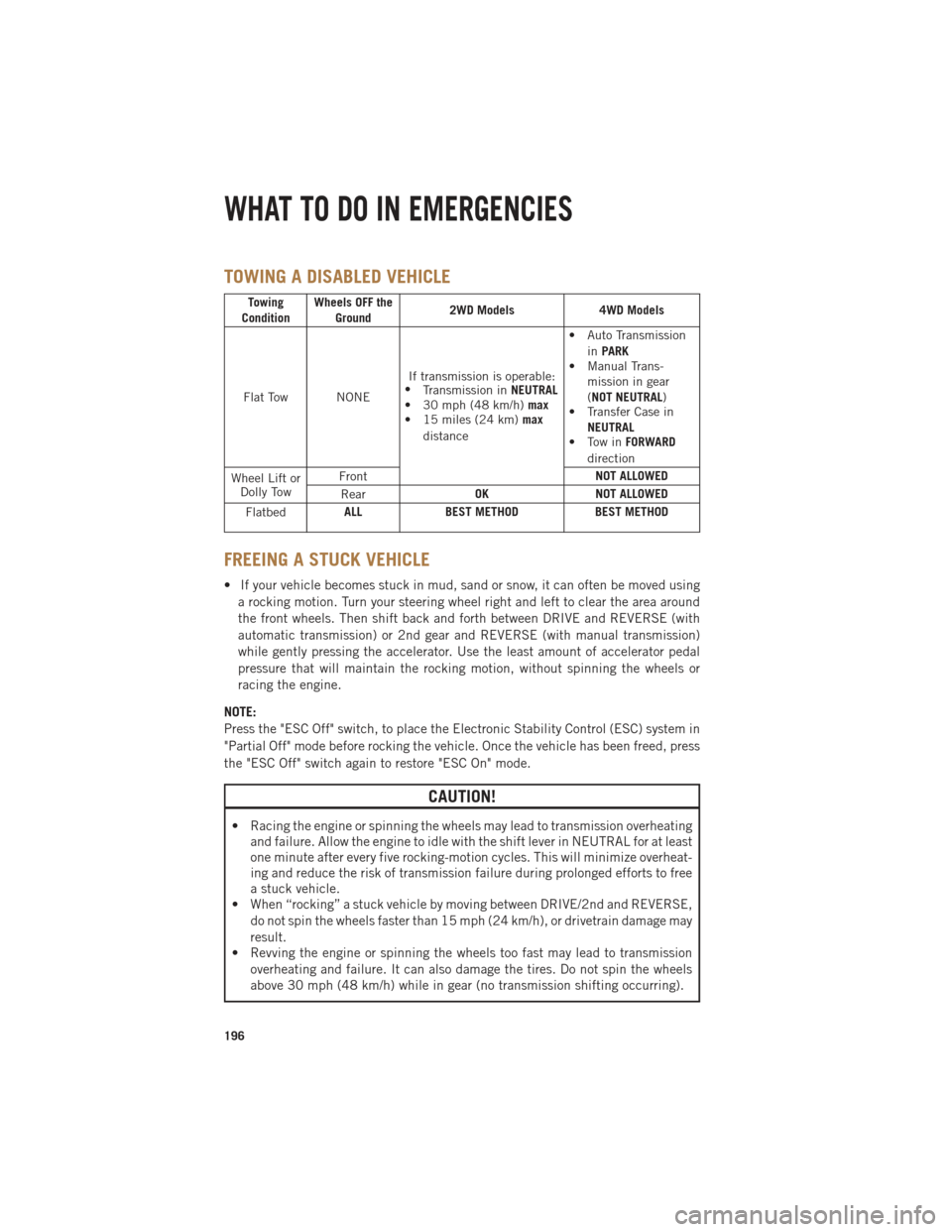
TOWING A DISABLED VEHICLE
Towing
Condition Wheels OFF the
Ground 2WD Models
4WD Models
Flat Tow NONE If transmission is operable:
• Transmission in NEUTRAL
• 30 mph (48 km/h) max
• 15 miles (24 km) max
distance • Auto Transmission
inPARK
• Manual Trans-
mission in gear
(NOT NEUTRAL)
• Transfer Case in
NEUTRAL
• Tow in FORWARD
direction
Wheel Lift or Dolly Tow Front
NOT ALLOWED
Rear OK
NOT ALLOWED
Flatbed ALL
BEST METHOD BEST METHOD
FREEING A STUCK VEHICLE
• If your vehicle becomes stuck in mud, sand or snow, it can often be moved using
a rocking motion. Turn your steering wheel right and left to clear the area around
the front wheels. Then shift back and forth between DRIVE and REVERSE (with
automatic transmission) or 2nd gear and REVERSE (with manual transmission)
while gently pressing the accelerator. Use the least amount of accelerator pedal
pressure that will maintain the rocking motion, without spinning the wheels or
racing the engine.
NOTE:
Press the "ESC Off" switch, to place the Electronic Stability Control (ESC) system in
"Partial Off" mode before rocking the vehicle. Once the vehicle has been freed, press
the "ESC Off" switch again to restore "ESC On" mode.
CAUTION!
• Racing the engine or spinning the wheels may lead to transmission overheating and failure. Allow the engine to idle with the shift lever in NEUTRAL for at least
one minute after every five rocking-motion cycles. This will minimize overheat-
ing and reduce the risk of transmission failure during prolonged efforts to free
a stuck vehicle.
• When “rocking” a stuck vehicle by moving between DRIVE/2nd and REVERSE,
do not spin the wheels faster than 15 mph (24 km/h), or drivetrain damage may
result.
• Revving the engine or spinning the wheels too fast may lead to transmission
overheating and failure. It can also damage the tires. Do not spin the wheels
above 30 mph (48 km/h) while in gear (no transmission shifting occurring).
WHAT TO DO IN EMERGENCIES
196
Page 244 of 252

Emergency, In Case ofFreeing Vehicle When Stuck . .196
Overheating ............175
Towing ........... 169, 196
Engine Block Heater ...........155
Break-In
Recommendations . .32, 145, 155
Compartment ...........199
Malfunction Indicator
(CheckEngine) ..........172
OilSelection ...........205
Overheating ............175
Starting ...............13
Stopping ..............13
Event Data Recorder .........197
Exhaust Brake .............157
Exhaust Regeneration ........148
Exterior Lights .............235
Filters EngineFuel ........ 147, 158
FlatTireStowage...........188
Fluid Capacities ............205
Fluids .................205
FogLights................34
Freeing A Stuck Vehicle .......196
Front And Rear ParkSense System...46
Front Heated Seats ...........27
Front ParkSense System ........46
Fuel Specifications ..........205
Fuse ..................230
Fuses..................230
Garage Door Opener (HomeLink
®)............120
Headlight ................34
Headlights Automatic .............34
Dimmer Switch ..........34
HighBeam .............33
Switch ...............34 Head Restraints
............24
Heated Seats ..............27
Heated Steering Wheel ........30
Heater, Engine Block .........155
High Beam/Low Beam Select (Dimmer) Switch ..........33
HomeLink
®
(Garage Door Opener) .......120
Hood Release .............198
HubCaps ...............186
Idle Up Feature ............158
Integrated Trailer Brake Controls . .138
Interior and Instrument Lights . . .7, 51
Intermittent Wipers (Delay Wipers) ............33
Introduction ...............3
Inverter Outlet (115V) ........123
Inverter, Power ............123
Jack Location .............176
Jump Starting .............190
KeyFob.................10 Arm The Alarm ...........14
Disarm The Alarm .........14
Keyless Enter-N-Go ...........12
Lock/Unlock ............12
Starting/Stopping .........13
LaneChangeandTurnSignals....33
Lane Change Assist ..........33
LATCH (Lower Anchors and TetherforCHildren)....17,18,19
Lights
Engine Temperature Warning. .170
TurnSignal .............33
Maintenance Record. . .218, 224, 229
Maintenance Schedule.... 214, 219, 225, 227
Malfunction Indicator Light(CheckEngine).......172
MemorySeat ..............26
INDEX
242
Page 245 of 252

Message CenterWater in Fuel .......146, 156
MOPAR
®Accessories .........238
Navigation ............85,103
New Vehicle Break-In Period..........32, 145, 155
OilChangeIndicator...... 174, 226
Oil Change Indicator, Reset .....174
Oil, Engine Capacity ..............205
Outlet Power ...............124
Overheating, Engine .........175
Panic Alarm ...............11
ParkSense
®System,
FrontAndRear ...........46
ParkSense
®System, Rear .......46
Pedals, Adjustable ...........31
Perform Service Indicator, Reset...226
PickupBox ..............129
Placard, Tire and Loading Information .............234
Power Distribution Center (Fuses) . . .230
Glass Sunroof ...........48
Inverter ..............123
Outlet (Auxiliary
Electrical Outlet) .........124
Seats ................25
Sliding Rear Window .......47
Steering ..............205
Preparation for Jacking ........178
Programmable Electronic Features ..............117
Rain Sensitive Wiper System .....33
RearCamera ..............47
Rear Heated Seats ...........29
Rear Park Assist System ........46
Rear ParkSense System ......46,47 Recreational Towing
.........140
Shifting into Transfer Case
Neutral (N) ............142
Shifting out of Transfer Case
Neutral (N) ............143
Remote Keyless Entry (RKE) Arm The Alarm ...........14
Disarm The Alarm .........14
Remote Starting System ........13
Replacement Bulbs ..........235
Reporting Safety Defects .......237
Resetting Perform Service Indicator ..............226
Restraint, Head .............24
Rocking Vehicle When Stuck ....196
Schedule,Maintenance.... 214, 219
Seat Belt Automatic Locking Retractor
(ALR) ................15
Child Restraints ........15,17
Energy Management Feature . . .15
Lap/Shoulder Belts .........15
Seat Belt Pretensioner ......15
Seat Belt Reminder ........15
Seats ...................25
Heated ...............27
Lumbar Support ..........25
Memory ...............26
Power ................25
Ventilated .............28
Security Alarm Arm The System ..........14
Disarm The System ........14
Security Alarm ...........14
Shifting Transfer Case, Shifting into
Transfer Case Neutral (N) ....142
Transfer Case, Shifting out of
Transfer Case Neutral (N) ....143
Shift Lever Override .........192
Signals, Turn ..............33
SIRIUS Travel Link ..........106
INDEX
243